Custom Providers and Models
vLLora is designed to be agnostic and flexible, allowing you to register Custom Providers (your own API endpoints) and Custom Models (specific model identifiers).
This architecture enables "bring your own endpoint" scenarios, such as connecting to self-hosted inference engines (like Ollama or LocalAI), private enterprise gateways, or standard OpenAI-compatible services.
The Namespace System
To prevent collisions between different services, vLLora organizes resources using a namespaced format:
<provider>/<model-id>
This structure ensures that a model ID like llama-3 from a local provider is distinct from llama-3 hosted on a remote gateway.
Example:
my-gateway/llama-3.3-70b
openai/gpt-4.1
anthropic/claude-3-5-sonnet
Configuration Entry Points
You can configure custom providers and models in two locations within the application:
- Settings: The centralized hub for managing all provider connections and model definitions.
- Chat Model Selector: A quick-action menu allowing you to add new models and providers on the fly without leaving your current thread.
Adding a Custom Provider

To connect an external service, click Add Provider in the Settings menu. This opens the configuration modal where you define the connection details and register initial models.
| Field | Required | Description |
|---|---|---|
| Provider Name | Required | A unique identifier that becomes the namespace for your models (e.g., entering ollama results in ollama/model-id). |
| Description | Optional | A short note to help you identify the purpose of this provider (e.g., "Local dev server" or "Company Gateway"). |
| API Type | Required | The communication protocol used by the upstream API. Select OpenAI-compatible for most standard integrations (Ollama, vLLM, LocalAI). See full list of Supported API Protocols |
| Base Endpoint URL | Required | The full URL to the upstream API. Ensure this includes the version suffix if required (e.g., http://localhost:11434/v1). |
| API Key | Optional | The authentication token. This is stored securely and used for all requests to this provider. Leave blank for local tools that do not require auth. |
Registering Models Inline
The Models section at the bottom of the modal allows you to register Model IDs immediately while creating the provider.
- Add Model ID: Type the exact ID used by the upstream API (e.g.,
llama3.2:70borgpt-4-turbo) and press Enter (or click the + button). - Configure Details: You can add more details about the context size and capabilities like
toolsandreasoningsupport
Adding a Custom Model
If you already have a provider set up—or want to quickly add a single model—use the Add Custom Model button (found in Settings or the Chat Model Selector).
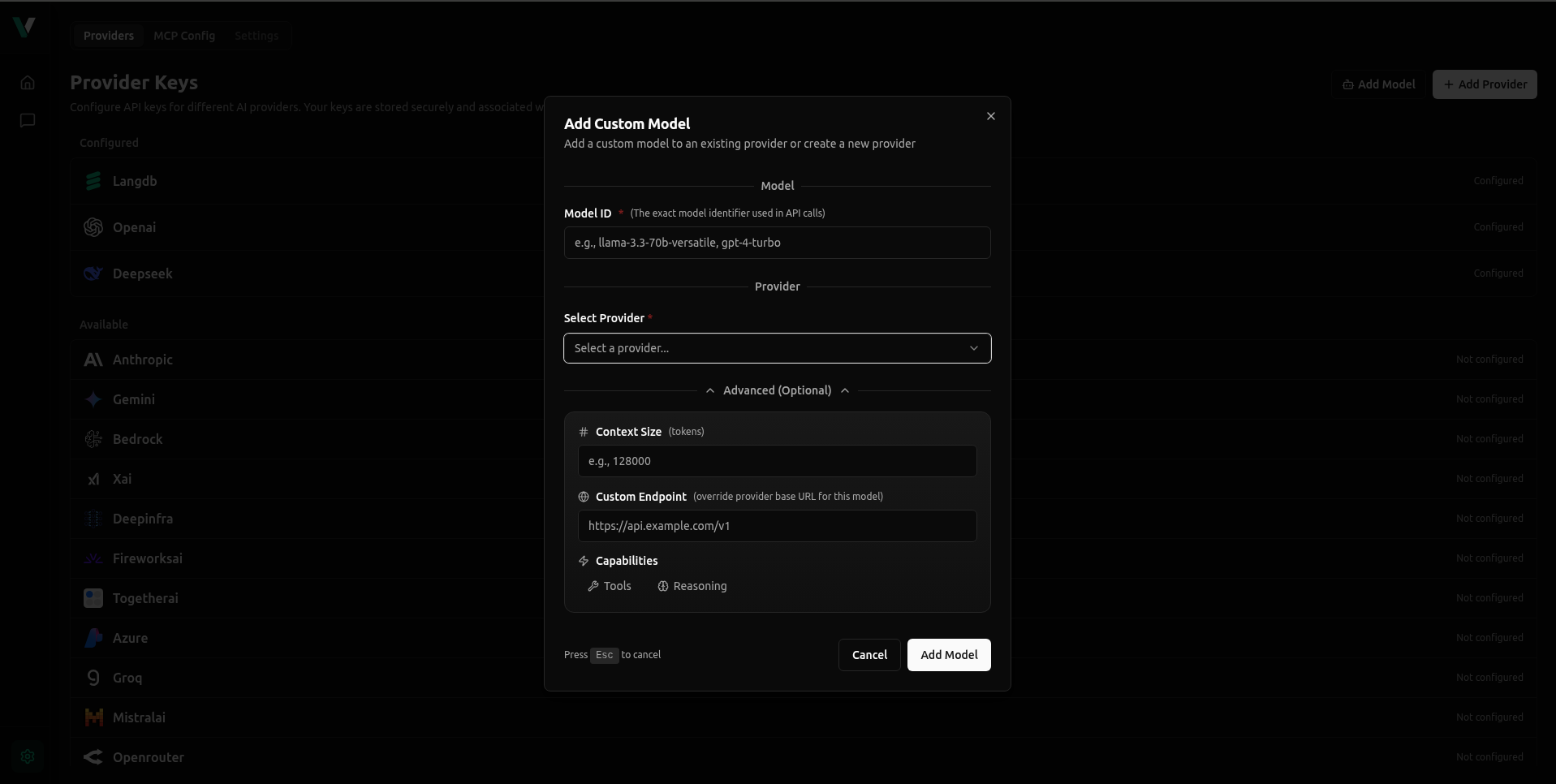
Configuration Flow
-
Provider: Select the upstream provider.
- Existing: Choose a provider you have already configured.
- Create New: Select "Create New Provider" to open the full Provider configuration modal described above.
-
Model ID: Enter the specific identifier (e.g., gpt-4o, deepseek-coder).
-
Model Name (Optional): A friendly display name for the UI.
Advanced Settings
-
Context Size: Define the token limit.
-
Capabilities: Toggle Tools or Reasoning support.
-
Custom Endpoint: Enter a URL here only if this specific model uses a different API endpoint than the provider's default Base URL.
Using Your Custom Models
Once added, no code changes are required. Models are accessed using the namespaced format:
provider-name/model-id
Examples:
ollama-local/llama3.2my-gateway/gpt-4.1
Practical Patterns
- One provider, many models: A single gateway entry (e.g., openai) hosting multiple IDs (gpt-4, gpt-3.5).
- Model-level overrides: Using the "Custom Endpoint" field in the Add Custom Model flow to point specific models to different URLs while sharing the same API key.
- Quick add from chat: Use the link in the Chat Model Selector to add a model while experimenting, then refine its settings later.
Supported API Protocols
- OpenAI-compatible
- Anthropic