MCP Support
vLLora provides full support for Model Context Protocol (MCP) servers, enabling seamless integration with external tools by connecting with MCP Servers through HTTP and SSE. When your model requests a tool call, vLLora automatically executes the MCP tool call on your behalf and returns the results to the model, allowing your AI models to dynamically access external data sources, APIs, databases, and tools during conversations.
What is MCP?
Model Context Protocol (MCP) is an open standard that enables AI models to seamlessly communicate with external systems. It allows models to dynamically process contextual data, ensuring efficient, adaptive, and scalable interactions. MCP simplifies request orchestration across distributed AI systems, enhancing interoperability and context-awareness.
With native tool integrations, MCP connects AI models to APIs, databases, local files, automation tools, and remote services through a standardized protocol. Developers can effortlessly integrate MCP with IDEs, business workflows, and cloud platforms, while retaining the flexibility to switch between LLM providers. This enables the creation of intelligent, multi-modal workflows where AI securely interacts with real-world data and tools.
For more details, visit the Model Context Protocol official page and explore Anthropic MCP documentation.
Using MCP with vLLora
vLLora supports two ways to use MCP servers:
- Configure MCP servers in settings - Set up MCP servers through the vLLora UI and use them in Chat
- Send MCP servers in request body - Include MCP server configuration directly in your chat completions API request
Method 1: Configure MCP Servers in Settings
You can configure MCP servers through the vLLora settings. Once configured, these servers will be available for use in the chat interface.
- Navigate to the Settings section in the vLLora UI
- Add your MCP server configuration
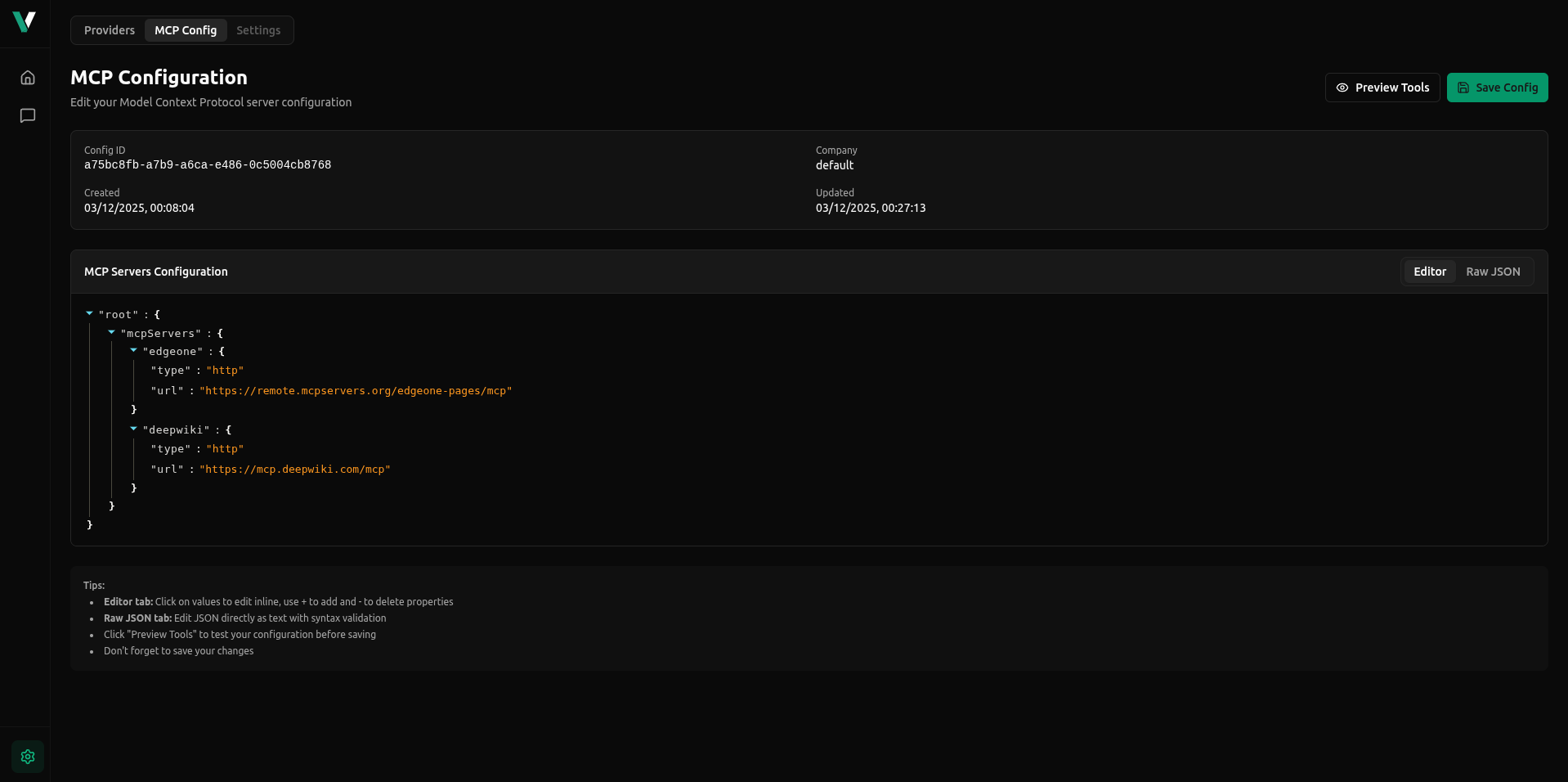
- Use the configured servers in your chat conversations
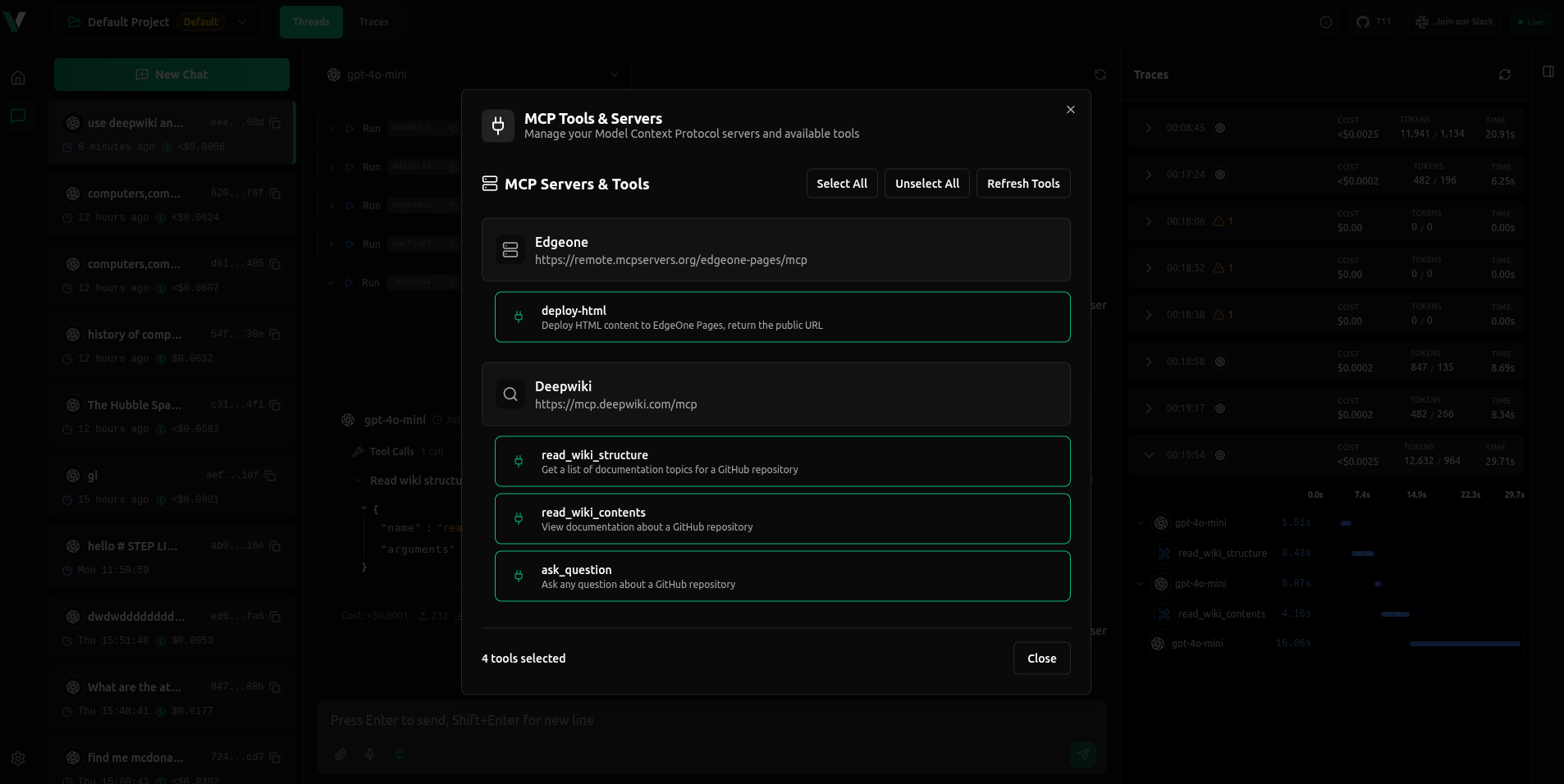
MCP servers configured in settings are persistent and available across all your projects. This is ideal for frequently used MCP servers.
Method 2: Send MCP Servers in Request Body
You can include MCP server configuration directly in your chat completions request body. This method gives you full control over which MCP servers to use for each request.
Request Format
Add an mcp_servers array to your chat completions request body:
{
  "model": "openai/gpt-4o-mini",
  "messages": [
    {
      "role": "user",
      "content": "use deepwiki and get information about java"
    }
  ],
  "stream": true,
  "mcp_servers": [
    {
      "type": "http",
      "server_url": "https://mcp.deepwiki.com/mcp",
      "headers": {},
      "env": null
    }
  ]
}
MCP Server Configuration
Each MCP server in the mcp_servers array supports the following configuration:
| Field | Type | Required | Description |
|---|---|---|---|
type | string | Yes | Connection type for MCP server. Must be one of: "ws" (WebSocket), "http", or "sse" (Server-Sent Events) |
server_url | string | Yes | URL for the MCP server connection. Supports WebSocket (wss://), HTTP (https://), and SSE (https://) endpoints |
headers | object | No | Custom HTTP headers to send with requests to the MCP server (default: {}) |
env | object/null | No | Environment variables for the MCP server (default: null) |
filter | array | No | Optional filter to limit which tools/resources are available from this server. Each item should have a name field (and optionally description). Supports regex patterns in the name field |
Complete Example
Here's a complete example using multiple MCP servers:
{
  "model": "openai/gpt-4o-mini",
  "messages": [
    {
      "role": "user",
      "content": "use deepwiki and get information about java"
    }
  ],
  "stream": true,
  "mcp_servers": [
    {
      "type": "http",
      "server_url": "https://mcp.deepwiki.com/mcp",
      "headers": {},
      "env": null
    },
    {
      "type": "http",
      "server_url": "https://remote.mcpservers.org/edgeone-pages/mcp",
      "headers": {},
      "env": null
    }
  ]
}
Using Filters
You can optionally filter which tools or resources are available from an MCP server by including a filter array:
{
  "mcp_servers": [
    {
      "filter": [
        {
          "name": "read_wiki_structure"
        },
        {
          "name": "read_wiki_contents"
        },
        {
          "name": "ask_question"
        }
      ],
      "type": "http",
      "server_url": "https://mcp.deepwiki.com/mcp",
      "headers": {},
      "env": null
    }
  ]
}
When filter is specified, only the tools/resources matching the filter criteria will be available to the model.
How MCP Tool Execution Works
When you include MCP servers in your request, vLLora:
- Connects to the MCP server - Establishes a connection using the specified transport type (HTTP, SSE, or WebSocket)
- Discovers available tools - Retrieves the list of tools and resources exposed by the MCP server
- Makes tools available to the model - The model can see and request these tools during the conversation
- Executes tool calls automatically - When the model requests a tool call, vLLora executes it on the MCP server and returns the results
- Traces all interactions - All MCP tool calls, their parameters, and results are captured in vLLora's tracing system
This means you don't need to handle tool execution yourself—vLLora manages the entire MCP workflow, from connection to execution to result delivery.
Code Examples
- Python
- curl
- TypeScript
from openai import OpenAI

client = OpenAI(
    base_url="http://localhost:9090/v1",
    api_key="no_key",
)

response = client.chat.completions.create(
    model="openai/gpt-4o-mini",
    messages=[
        {
            "role": "user",
            "content": "use deepwiki and get information about java"
        }
    ],
    stream=True,
    extra_body={
        "mcp_servers": [
            {
                "type": "http",
                "server_url": "https://mcp.deepwiki.com/mcp",
            }
        ]
    }
)
curl -X POST 'http://localhost:9090/v1/chat/completions' \
  -H 'Content-Type: application/json' \
  -d '{
  "model": "openai/gpt-4o-mini",
  "messages": [
    {
      "role": "user",
      "content": "use deepwiki and get information about java"
    }
  ],
  "mcp_servers": [
    {
      "type": "http",
      "server_url": "https://mcp.deepwiki.com/mcp",
    }
  ]
}'
import OpenAI from 'openai';

const client = new OpenAI({
  baseURL: 'http://localhost:9090/v1',
  apiKey: 'no_key',
});

const response = await client.chat.completions.create({
  model: 'openai/gpt-4o-mini',
  messages: [
    {
      role: 'user',
      content: 'use deepwiki and get information about java',
    },
  ],
  // @ts-expect-error mcp_servers is a vLLora extension
  mcp_servers: [
    {
      type: 'http',
      server_url: 'https://mcp.deepwiki.com/mcp'
    },
  ],
});