Debugging Agents: Why Prompt Tweaks Can't Fix Stale State

In the earlier deep-agent case study (Browsr), I focused on architecture. Here I'll stay grounded in one debugging failure I hit in a maps agent—a failure that looked like a prompt problem but wasn't. The agent behaved correctly in chat, the UI looked correct, and yet the results were consistently from the wrong area. I tried the usual prompt tweaks: stronger instructions, "be careful," "use the visible map," retries. None of it moved the needle.
Here's how map state flows through the agent loop and where it can drift:
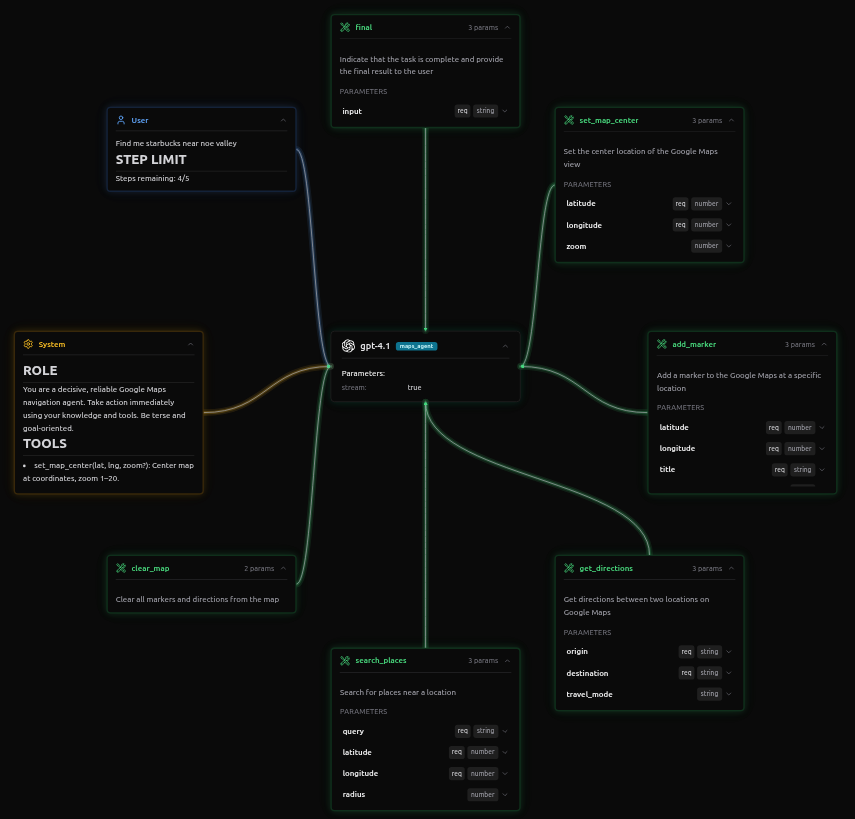
The Bug
The user expectation was simple:
- Pan the map to the neighborhood you care about.
- Ask for "Starbucks."
- Get Starbucks locations in what's visible on the map.
What I observed instead:
- The user panned and zoomed to San Francisco.
- The agent responded confidently and took action.
- The places returned were from Mumbai, not San Francisco.
Nothing in the conversation transcript looked obviously wrong. The root cause: the agent wasn't getting the context of what the user was seeing on the map. The mismatch was between the visible map state on the user's screen and what the agent had access to when making tool calls.
The Tool Payloads
You don't need the implementation to see the bug. The tool call arguments are enough. Here's the wrong tool call:
{
  "name": "search_place_by_name",
  "arguments": {
    "query": "Starbucks"
    // MISSING CONTEXT:
    // No "center_point" or "viewport_bbox" passed here.
    // The backend silently defaulted to the session start location (Mumbai).
  }
}
The tool was called without any location context because the agent didn't have access to what the user was seeing on the map. It defaulted to GPS/stale coordinates internally, so results came from the wrong area.
After I fixed the state being passed through, the tool call looked like this:
{
  "name": "search_places",
  "arguments": {
    "latitude": 37.7476,
    "longitude": -122.4337,
    "query": "starbucks"
  }
}
Now the visible map coordinates are explicitly passed, and results align with what the user is looking at.
And importantly, retries didn't help. Without correcting the state, the agent would keep calling search_place_by_name without location, producing the same wrong results.
The agent wasn’t “bad at following instructions.” It was acting on the wrong state.
Why Prompt Tweaks Failed
I had already told the agent the right thing, in multiple forms:
- Search where the user is looking.
- Prefer the visible map area over the user's location.
- If the map moved, use the new location.
But the agent couldn't see what the user was seeing on the map. The agent didn't have access to the current map view context—the center coordinates, zoom level, or visible bounds. When the user panned to San Francisco, that information stayed on the client side and never made it to the agent's context.
The agent can't follow an instruction that depends on information it doesn't have. When the tool schema expects explicit coordinates, and the agent's internal state still contains GPS/default coordinates (because it never received the updated map context), retries reproduce the same error:
- The prompt is correct.
- The reasoning is coherent.
- The tool arguments are wrong because the agent doesn't have the map context.
How I Discovered It
I found this bug by inspecting the tool call arguments in the execution logs. The logs showed the search_place_by_name tool being called with just the query—no location context.
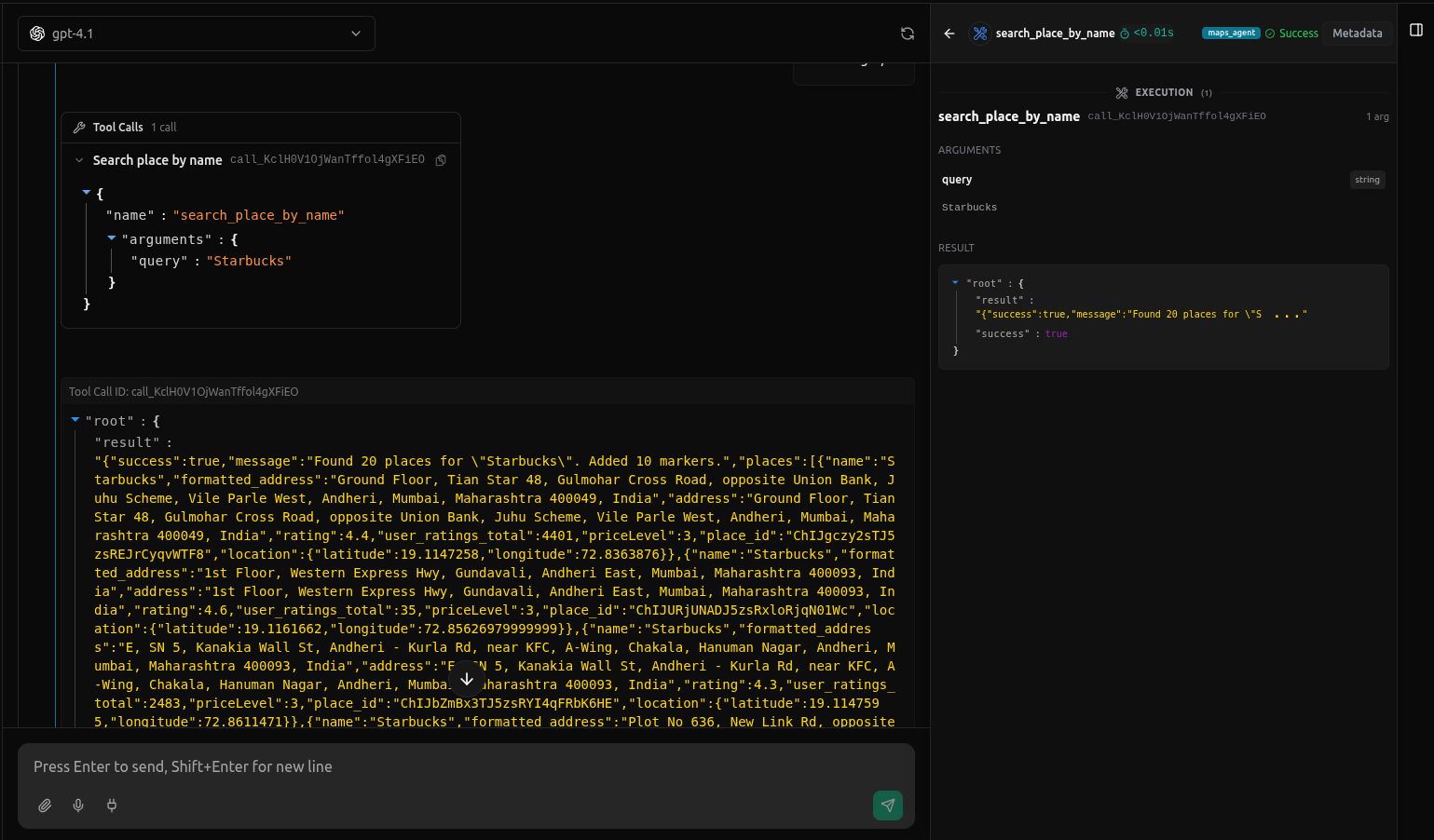
The results came back from the wrong area because the agent never received the context of what the user was seeing—it was using stale GPS coordinates internally instead of the visible map bounds the user was actually looking at. Once I saw this mismatch between what the user saw and what the agent knew, the rest of the debugging was straightforward. I used vLLora to capture these traces, which made the missing location argument obvious immediately.
The Fix
The fix wasn't changing prompts or tool schemas. It was ensuring the map state flowed from the React frontend to the agent's execution context.
Here's the mechanism:
Frontend: React state tracking. The Google Maps component (GoogleMapsManager) tracks the current map center and zoom in React state. When the user pans or zooms, setCenter and setZoom update this state. This state lives entirely on the client side—the backend agent never sees it unless we explicitly send it.
State capture on message send. When the user types a message and submits it, we capture the current map state from React before sending the request to the agent backend. The Chat component reads center and zoom from the map component's state at that moment.
Context injection into agent execution. We inject the captured map coordinates into the agent's execution context. In our setup, this happens through the task context object that gets passed with each agent invocation. The context includes:
{
  map_center: { latitude: 37.7749, longitude: -122.4194 },
  map_zoom: 13
}
This context is available to the agent throughout its execution. The agent's system prompt can reference these values, or they can be injected directly into tool calls.
Agent uses context in tool calls. The agent now has access to the visible map coordinates. When it needs to call search_places, it extracts the coordinates from the context and passes them explicitly:
{
  "name": "search_places",
  "arguments": {
    "latitude": 37.7749,  // from context.map_center.latitude
    "longitude": -122.4194,  // from context.map_center.longitude
    "query": "starbucks"
  }
}
The tools themselves don't change—search_places still requires explicit latitude and longitude parameters. What changed is that the agent now receives the current visible map coordinates as context, so when the user pans to San Francisco and asks for "Starbucks," the agent uses the San Francisco coordinates instead of defaulting to GPS or stale coordinates.
Alternative approaches we considered:
- WebSocket sync: Continuously sync map state to the backend. Too much overhead for infrequent updates.
- Specialized tool: Add a
get_current_map_state()tool the agent could call. Adds latency and another step the agent might forget. - Augment system prompt: Inject coordinates directly into the system prompt string. Works, but harder to debug and less flexible than structured context.
The context injection approach is clean: the state flows once per message, the agent has structured access to it, and we can inspect it in logs.

After the fix, the tool calls now include the visible map context, and the results appear exactly where the user is looking.
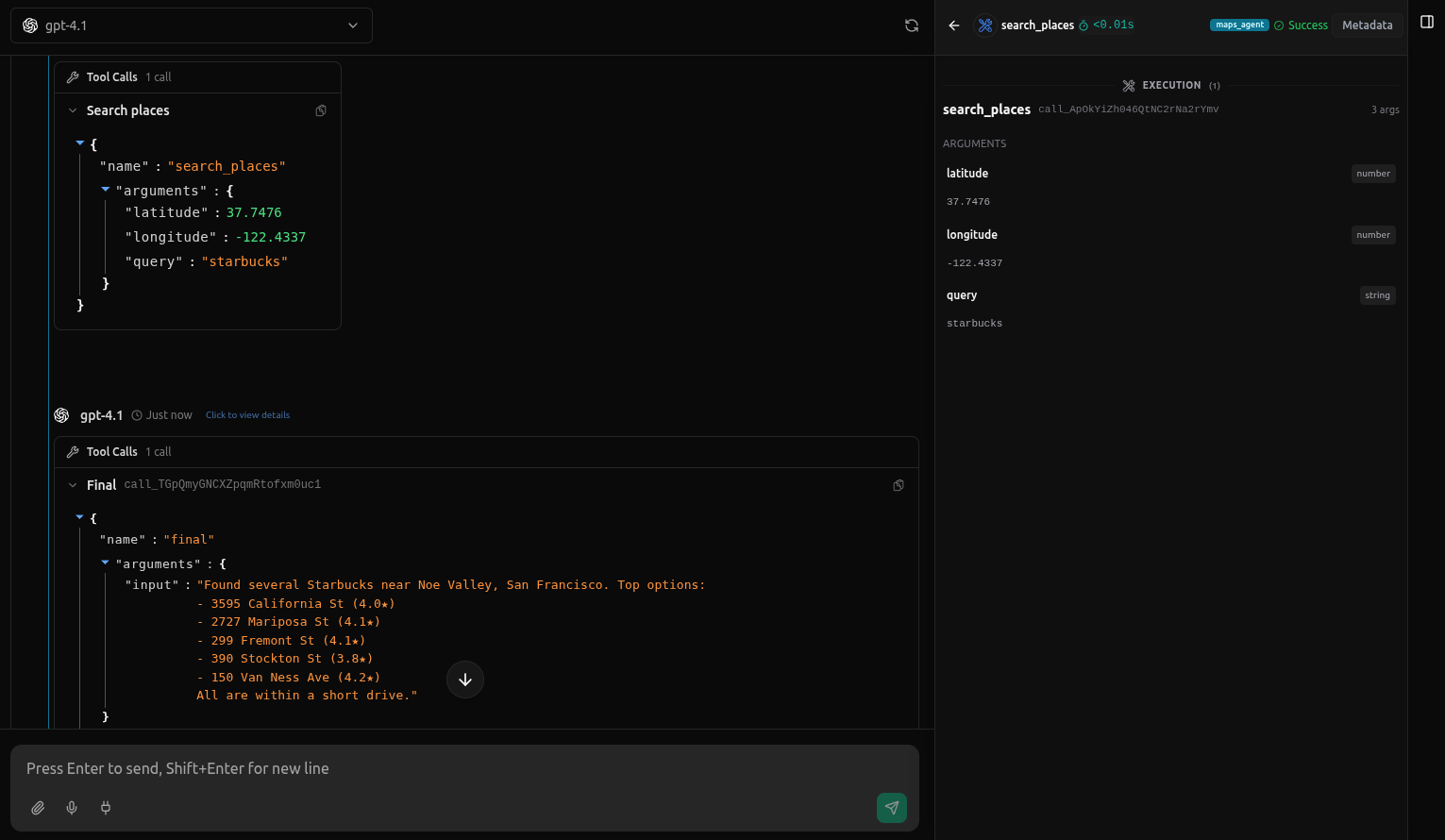
The logs show the corrected behavior: location context is now properly passed through in the execution context, and the search results align with the visible map area.
In hindsight, it's obvious. Without inspecting the actual tool call arguments, it wasn't.
The Lesson
This maps bug is one instance of a broader class:
- The UI can be correct.
- The agent's narration can be correct.
- The tool call can still be wrong if state is stale, mis-scoped, or silently substituted.
Prompt tweaks help when the agent is misunderstanding an instruction. They don't help when the agent is faithfully executing the wrong state. That's when you need to inspect what context the agent actually has—and log or trace what state flows through your tool calls.
Building Better Agents
This bug highlights a design pattern for building agents that need to stay in sync with dynamic UI state:
Explicitly pass visible state into agent context. If your agent needs to act on what the user is seeing (map location, selected text, visible table rows, etc.), don't assume the agent knows. Make the connection explicit: when the user interacts with the UI, capture that state and inject it into the agent's context before each turn.
Design your state flow. Map out what state your agent needs to make correct tool calls. Then trace where that state lives (UI component, backend, user session) and ensure it flows through to the agent at the right time. The maps agent needed map center/zoom—those live in React state and get passed through the task context.
Inspect tool arguments, not just responses. The conversation looked fine because the agent's responses were coherent. The bug was in the tool call arguments. Make tool call inspection part of your debugging workflow—capture the actual arguments being sent, not just the tool responses or conversation transcript.
Prefer explicit context over implicit defaults. The search_place_by_name tool defaulted to GPS coordinates when location wasn't provided. That default masked the real problem. Better to require explicit parameters or fail fast when context is missing.
The fix wasn't changing prompts or tool schemas—it was ensuring the agent receives the state it needs to make correct decisions. That's the difference between debugging symptoms and fixing architecture.