Exploring Deep Agent Architecture with vLLora: Case Study – Browsr

Over the last year, agents have grown from one-shot prompt wrappers into systems that can work a problem for minutes or hours—researching, trying ideas, fixing mistakes, and resuming where they left off. Tools like Claude Code, Deep Research, Manus AI, and LangChain’s deep-agents all use this pattern.
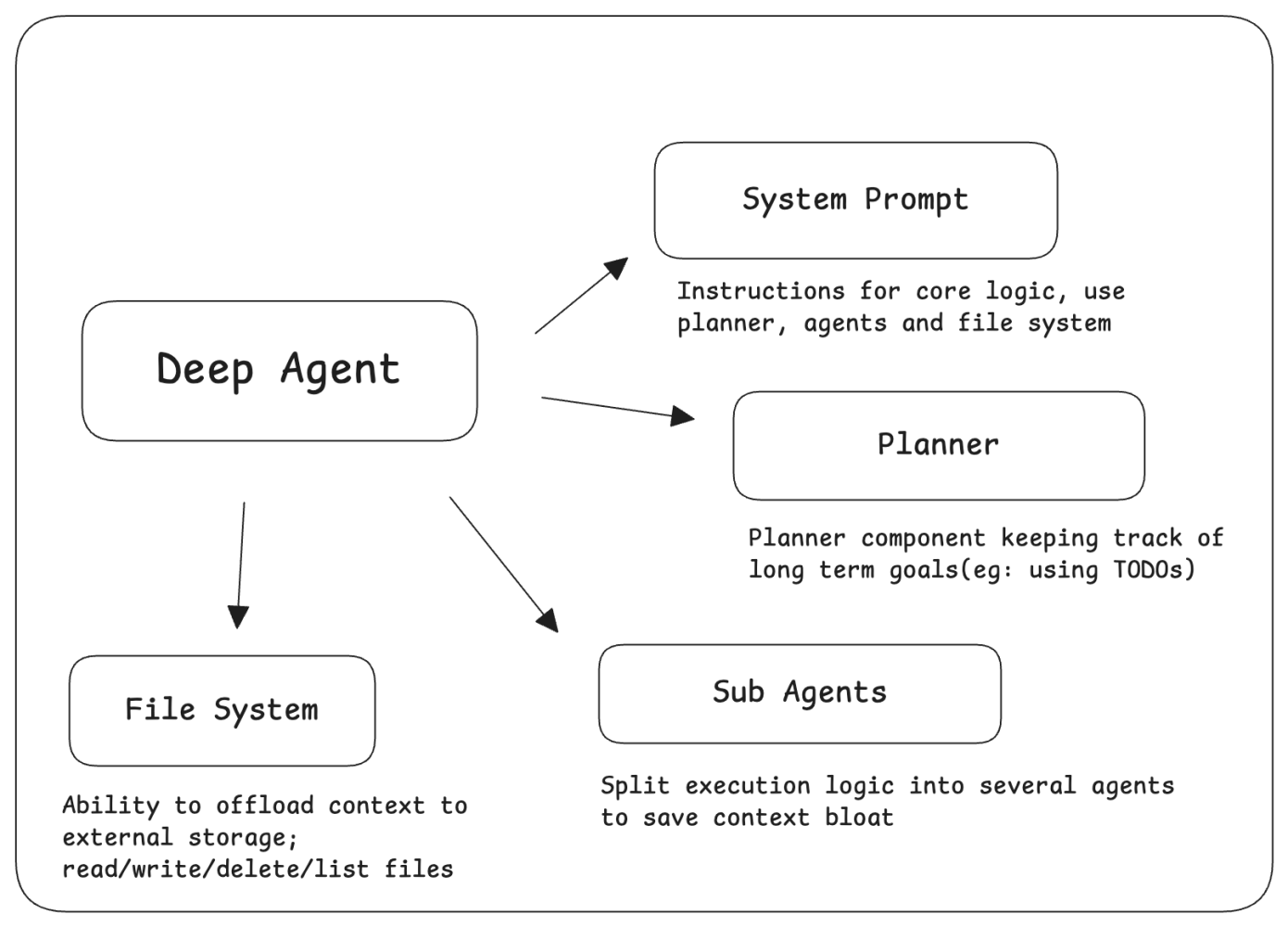
A typical deep-agent architecture:
- Keeps a running plan / TODO list of what still needs to be done.
- Uses tools (like a browser, shell, APIs) to act in the world step by step.
- Stores persistent memory (artifacts, notes, intermediate results) so it doesn’t forget earlier work.
- Regularly evaluates its own progress, adjusts the plan, and retries when something fails.
Because it can plan, remember, and correct itself, a deep agent can run for a long duration, tens or hundreds of steps without losing the thread of the task.
Let’s debug and observe Browsr using vLLora(a tool for agent observability) and see what happens under the hood.
Browsr
Browsr is a headless browser agent that lets you create sequences using a deep agent pattern and then hands you the payloads to run over APIs at scale. It also exports website data as structured or LLM-friendly markdown.
You can explore the definition and related configurations in this repo.
Note: Always respect the copyright rules and terms of the sites you scrape.
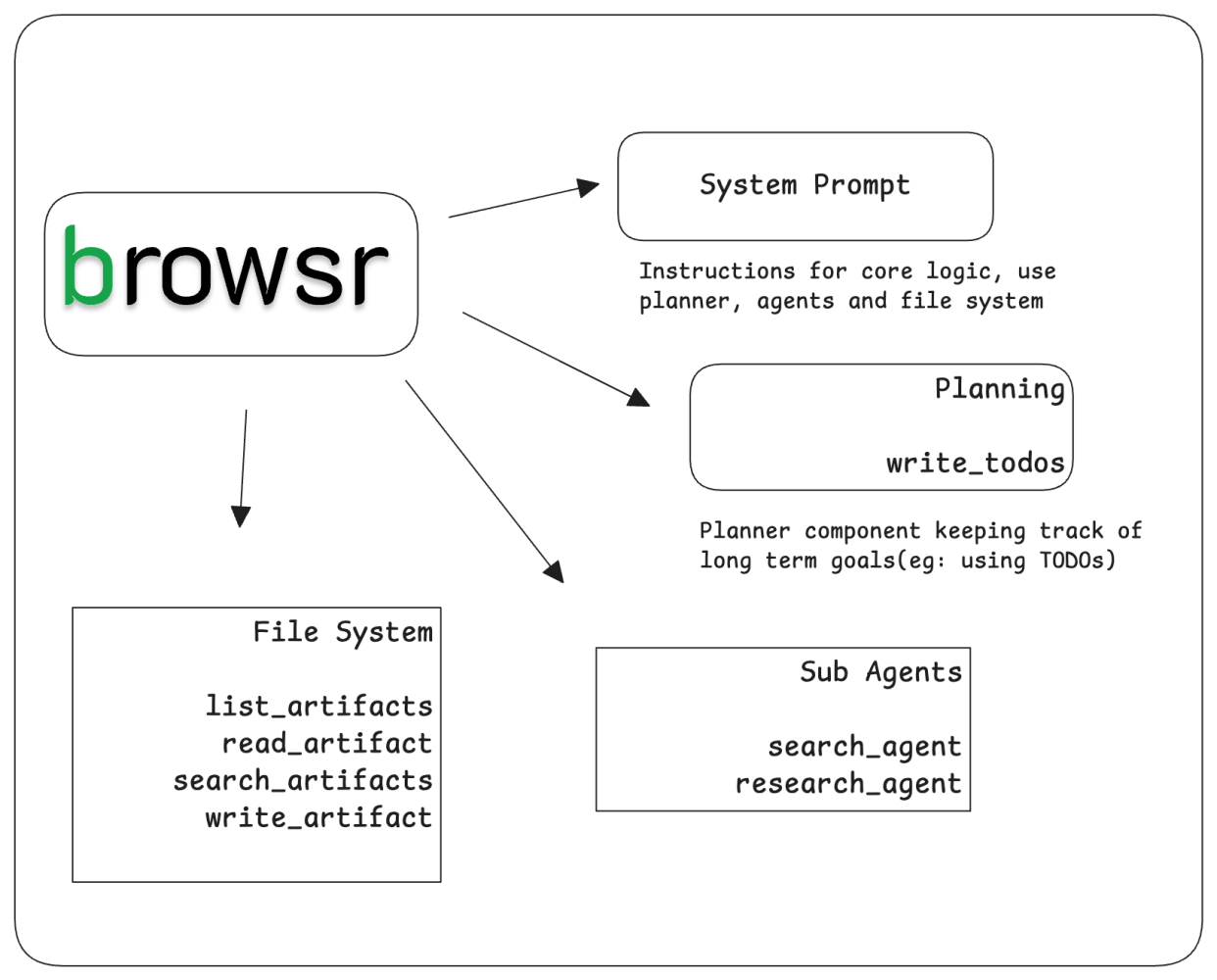
Debugging with vLLora
In this article, we use vLLora to illustrate how deep agents work. vLLora lets you debug and observe your agents locally. vLLora can help us to better understand our architecture; toolcalls and observe the full agent timeline. It also works with all popular models.
Browsr iterates in 1–3 command bursts as a single step, saving context to artifacts and completes the task with final tool.
- Driver: browser_step is the main executor; every turn runs 1–3 browser commands with explicit thinking, evaluation_previous_goal, memory, and next_goal.
- Context control: Large tool outputs are written to disk so the model can drop token-heavy responses and reload them on demand.
- Stateful loop: Up to eight iterations, each grounded in the latest observation block (DOM + screenshot) to avoid hallucinating.
- Strict tool contract: Exactly one tool call per reply (no free text), keeping the agent deterministic and debuggable.
Lets further examine tool definitions as stated below.
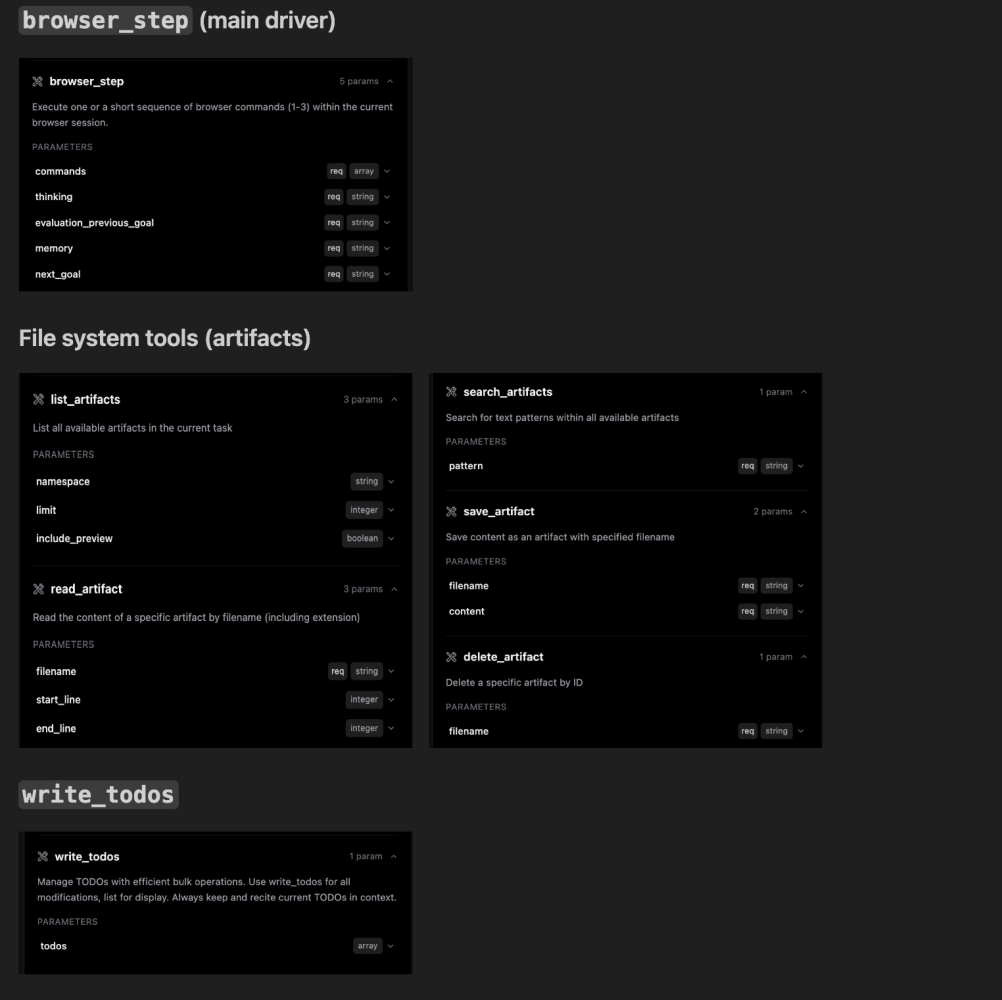
browser_step is the driver between steps. The system prompt forces the model to read the latest DOM and screenshot, report the current state, and then decide what to do next. Each turn must include:
- thinking: Reasoning about the current state.
- evaluation_previous_goal: Verdict on last step
- next_goal: Next immediate goal in one sentence.
- commands: Array of commands to be executed.
You can checkout the full agent defintion here.
Example: In one representative run, Browsr used the available context to navigate in step one, click in step two, and then run a JS evaluation to return structured data from the page.
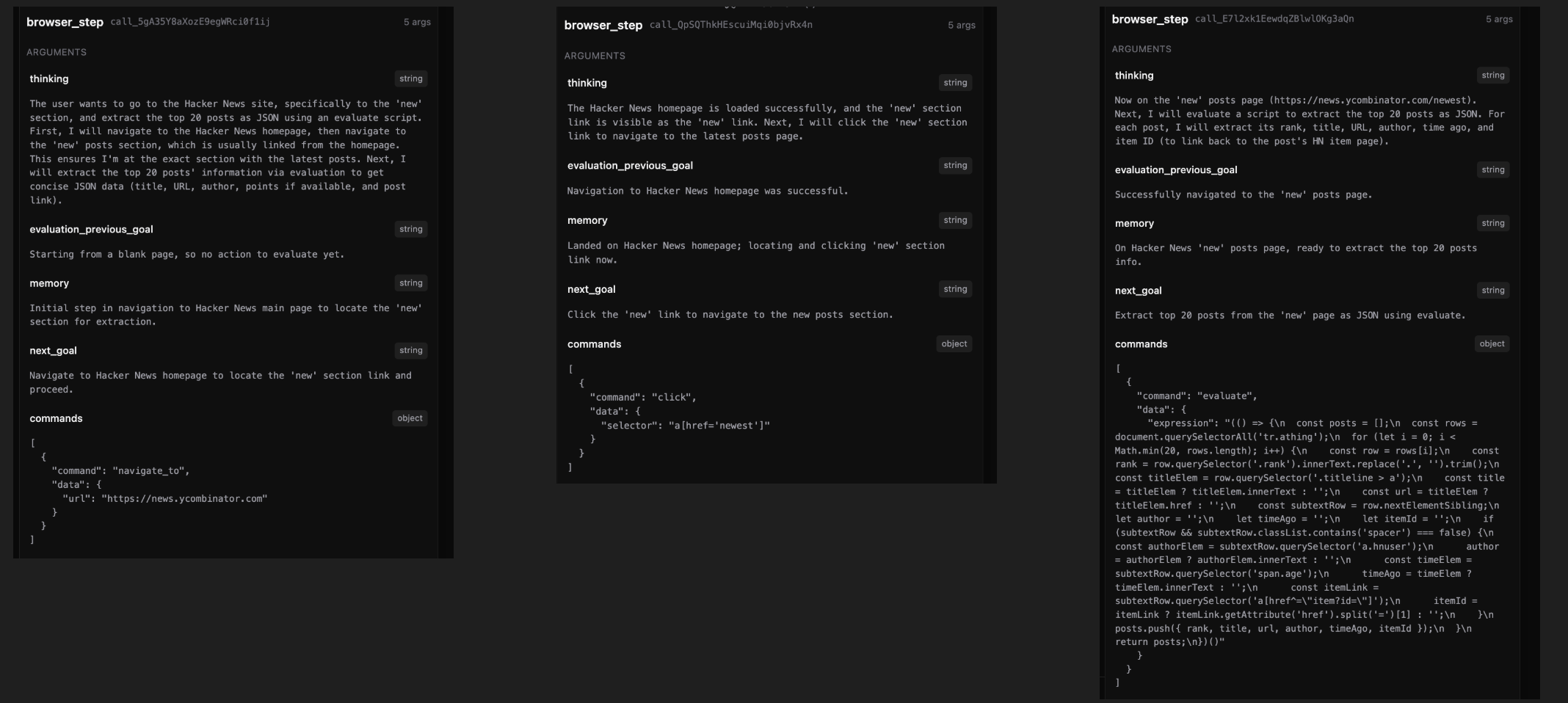
Sample Traces
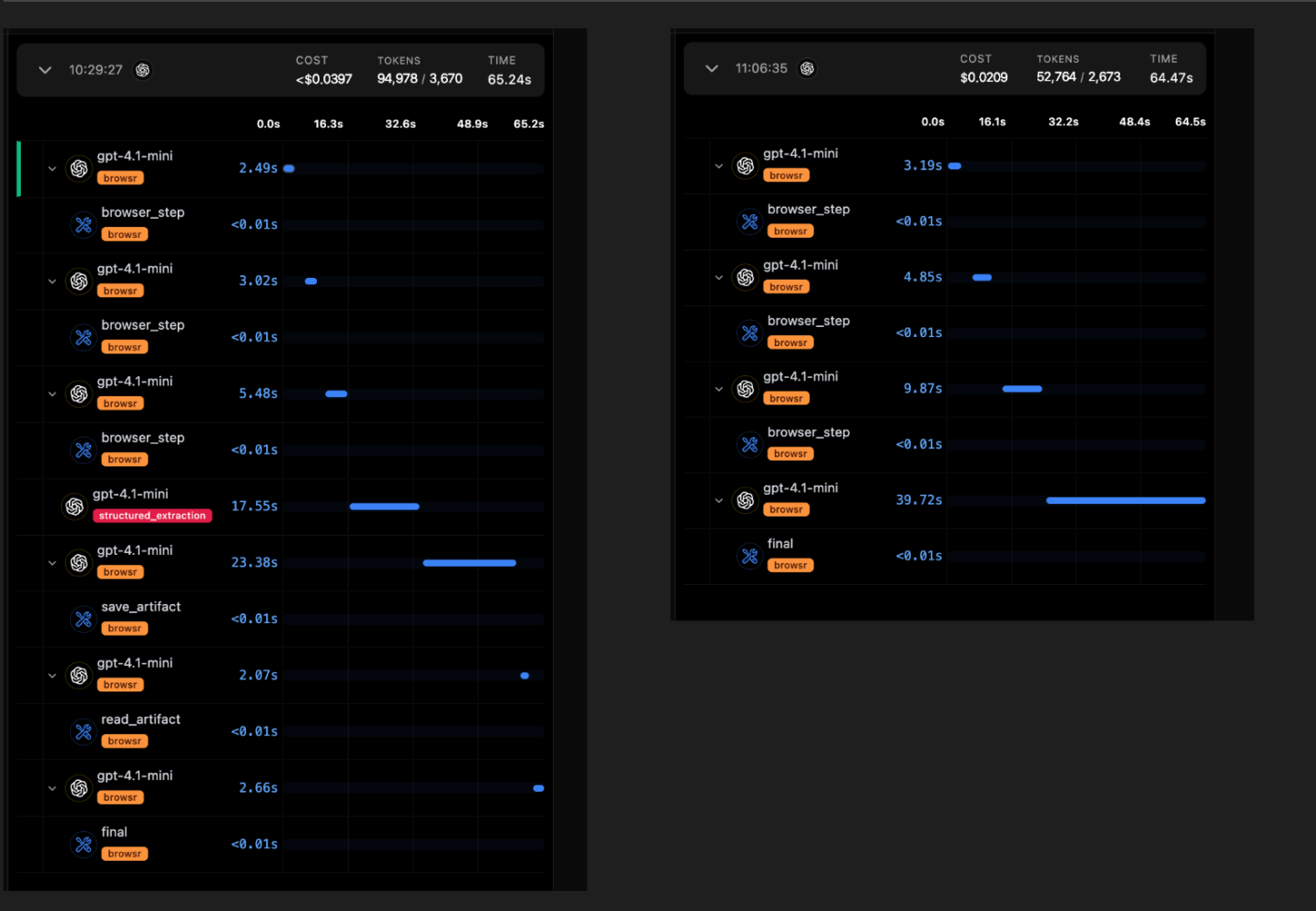
Average cost and no. of steps using gpt-4.1-mini
- Average cost per trace ≈ $0.0303 per run
- Average steps ≈ 10.5 steps per run
Why Observability is Critical for Deep Agents
AI engineers spend a lot of time trying to understand why their agents behave the way they do tweaking system prompts, stepping through tool calls, and guessing what went wrong somewhere in the middle of a long run.
As agents move from single-shot tasks to long-running, multi-step workflows, understanding their behavior becomes extremely harder. A "deep agent" might run for 50+ steps, making hundreds of decisions.
- Drift over time: An agent can start off doing exactly what you want, then slowly drift off-course because of noisy context, misinterpreted instructions, or a small misunderstanding early on that compounds over later steps.
- Expose cost and context: Spot token spikes, context bloat, and expensive branches and compare between different models.
- Make decisions traceable: Line up what the agent read, wrote, and decided so you can see cause and effect.
- No big-picture view of execution: You rarely get a clear, end-to-end picture of where time and money are going: is it planning, tool execution, retries, or extraction?
vLLora is built to make this debuggable. It lets you see what your deep agents are actually doing across long runs.
Next Steps
- Explore and compare using other models
- Test the architecture with different LLMs to evaluate performance and cost-effectiveness
- Test Computer use automation with custom fine tuned models
- Extend the agent's capabilities beyond the browser to general computer use, leveraging fine-tuned models for specific tasks.
- Simulate a complex scenario involving several steps to showcase real capability of deep agents.
In the next article, we'll explore these extensions and how they change the agent behavior.