Introducing Lucy: Trace-Native Debugging Inside vLLora

Your agent fails midway through a task. The trace is right there in vLLora, but it's 200 spans deep. You start scrolling, scanning for the red error or the suspicious tool call. Somewhere in those spans is the answer, but finding it takes longer than it should.
Today we're launching Lucy, an AI assistant built directly into vLLora that reads your traces and tells you what went wrong. You ask a question in plain English, Lucy inspects the trace, and you get a diagnosis with concrete next steps. Lucy is available now in beta.
Why finding out what went wrong is hard
Agent failures don’t look like traditional exceptions. A single bad response is usually the result of a chain of small choices spread across a long execution.
- Long traces: One thread can include hundreds of spans across model calls, tool calls, retries, and fallbacks.
- Delayed symptoms: The root cause often happens early, but only becomes visible much later in the run.
- Silent degradation: A thread can be marked "successful" while actually running with missing data, wrong assumptions, or a broken tool path.
When debugging becomes "scroll until you get lucky," you miss important signals and burn time (and tokens) doing it.
Lucy is good at exactly this: reading the trace end-to-end, spotting failure patterns, and turning them into actionable fixes.
What can you ask Lucy to do
Lucy sits next to your traces and threads. Ask a plain-English question, and it will inspect the trace, flag failure points, and return a fix-oriented report: root cause, impact, and recommended next steps.
Ask Lucy questions like:
- Analyze this thread for issues
- Check for errors in this thread
- Show me the slowest operations
- What's the total cost?
Lucy can also help you spot patterns across multiple failing runs and suggest prompt rewrites to reduce ambiguity.
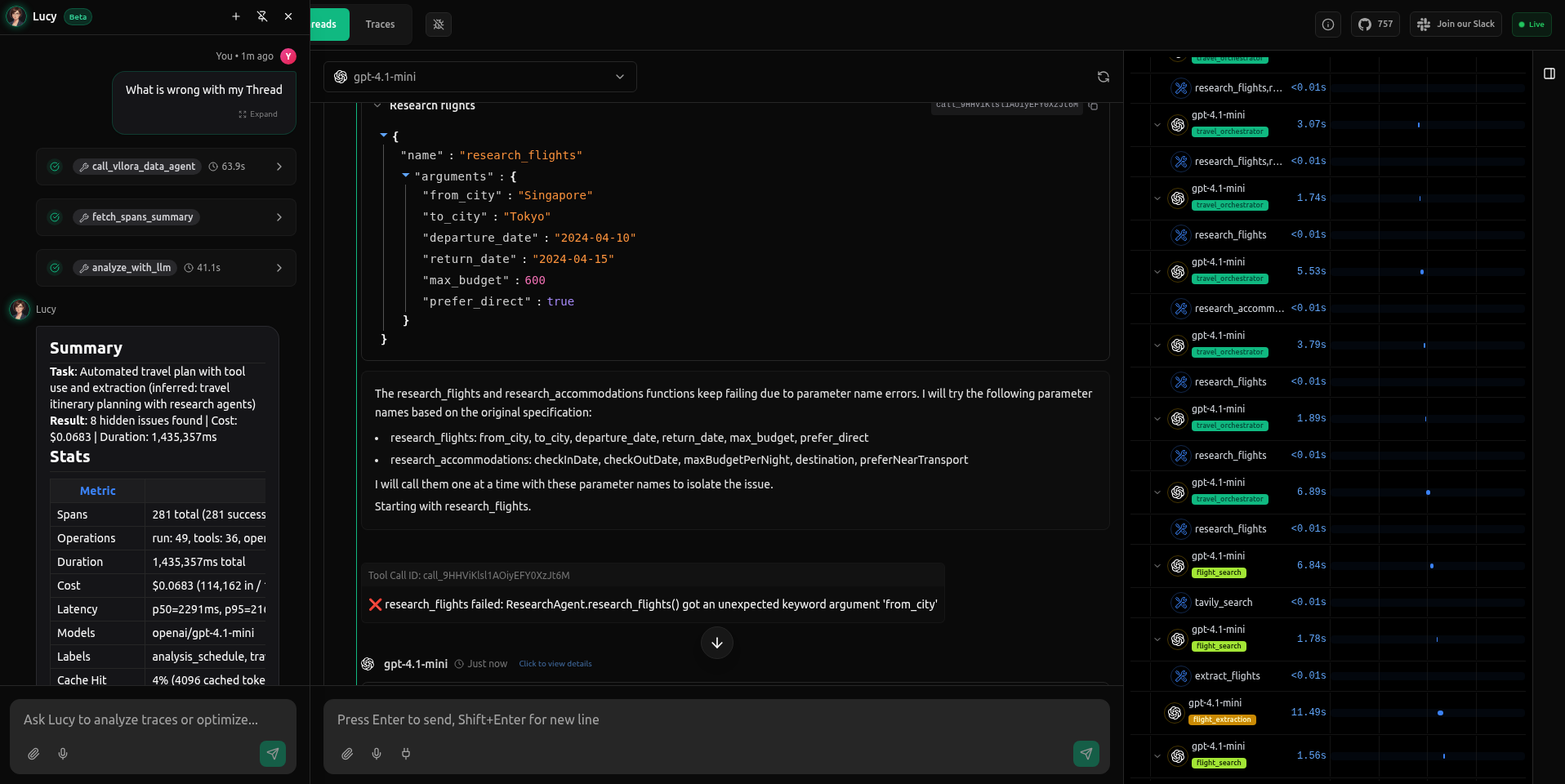
"What’s wrong with my thread?"
We had a Travel agent which was running for a long time, apparently stuck in a loop within the BetweenHorizonalEnd span. Instead of digging through the logs manually, we simply asked Lucy:
What's wrong with my thread?
Lucy inspected the thread's spans, identified a recurring failure pattern, and explained the root cause and impact, along with concrete next steps.
What Lucy found: Schema mismatches and contradictory prompts
In this trace, the agent was failing to complete a travel itinerary. Lucy didn't just flag the error; she identified a complex failure pattern involving both the code (schema) and the instructions (prompt).
1. The "Hallucinated" Arguments
Lucy pinpointed exactly why the tools were failing. The model was trying to call research_flights with a from_city argument and research_accommodations with check_in_date.
- The Diagnosis: "Severe Tool Schema Mismatch."
- The Reality: These arguments didn't exist in the registered tool definition, causing the model to hit a wall of
unexpected keyworderrors.
2. The Hidden Logic Trap Critically, Lucy found a root cause that a human scanning logs would likely miss: Prompt Contradiction.
- The Conflict: The system prompt instructed the agent to "prefer analysis only" while simultaneously telling it that it "MUST call tools."
- The Result: The model was paralyzed between two opposing instructions, leading to the erratic tool behavior.
3. Silent Failures (Truncation)
Lucy also caught a silent degradation issue: Severe Output Truncation. The Restaurant Extraction step was hitting token limits and cutting off data mid-list (output_tokens: 4000... truncated). The run looked "successful" to the server, but the downstream user was getting incomplete data.
Lucy’s report turned a vague "it's not working" complaint into three distinct engineering tasks: fix the tool schema, clarify the system prompt, and increase the context window for extraction.
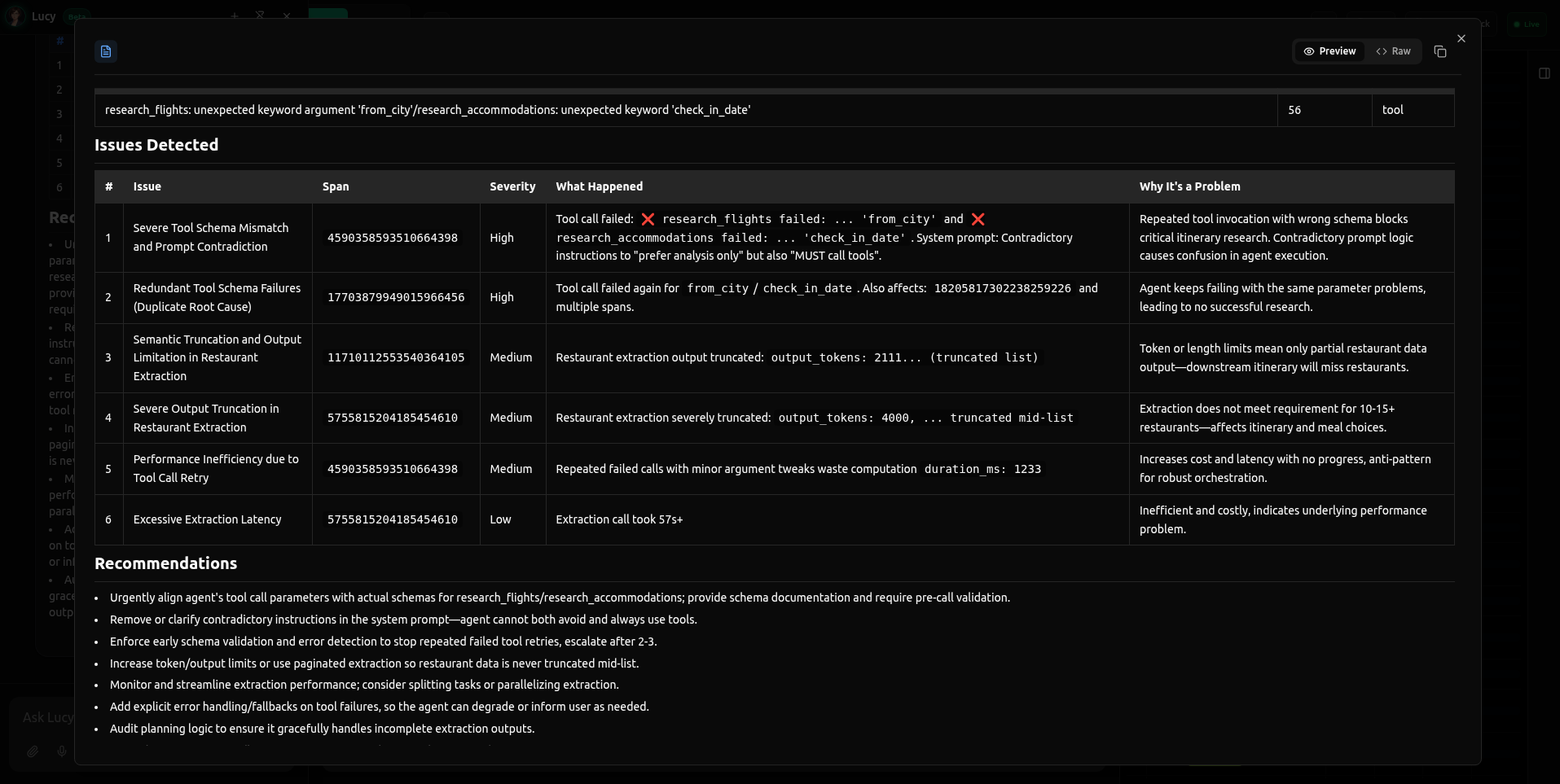 Caption: Lucy analyzes the trace and detects multiple issues simultaneously: invalid tool arguments (
from_city), contradictory system prompt instructions, and token truncation in the output.
Why this matters in production
This is a common failure mode in tool-using agents: when the tool contract isn't perfectly aligned (schema, handler, prompt, examples), the model starts guessing.
The cost isn't limited to a single failed call:
- Latency increases as the agent retries and thrashes on deterministic validation failures
- Cost increases as token usage accumulates across repeated attempts
- Quality degrades when the agent gives up on structured tools and improvises without real data
Even if your run "succeeds," you can still be paying for broken execution paths.
How Lucy works with vLLora tracing
Lucy's intelligence comes from vLLora's tracing infrastructure. vLLora captures everything your agent does:
- Spans: Individual operations like LLM calls, tool executions, and retrieval steps
- Runs: A single execution of your agent, made up of a tree of spans
- Threads: A full conversation, containing multiple runs over time
When you ask Lucy a question, it pulls the relevant spans and runs, reconstructs the execution flow, and analyzes patterns across the data. This is context that would take a human hours to piece together manually.
Get started
Lucy is available now in beta for all vLLora users.
- Click the Lucy icon in the bottom right corner.
- Ask a question like "What's wrong with my thread?"
- Get an instant diagnosis without leaving your workflow.
Lucy will inspect your active context and give you a clear diagnosis, so you can spend less time scrolling and more time shipping.
See the full Lucy documentation here